How to Track Event Attendance for Nonprofit Fundraisers and Community Events
Effective event attendance tracking for nonprofit fundraisers and community events has become essential for nonprofits who…
Read More →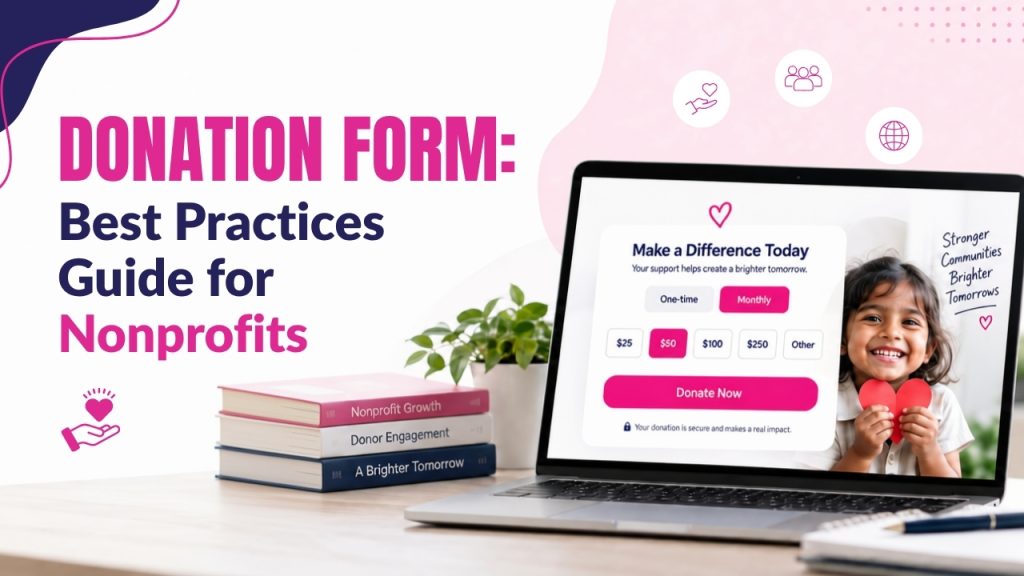
Short on time? Let AI do the work. Get the key points.
A well-designed donation form is essential for nonprofits that want to create a simple, trustworthy, and effective online giving experience. Following donation form templates best practices helps organizations to reduce friction, improve donor trust, and encourage more supporters to complete their donations.
An effective nonprofit donation form should make giving convenient while clearly explaining how donations support the mission of the organization.
Several elements influence the performance of an online giving experience. Nonprofits must ensure that their online donations should be easy to complete, while recurring donations can help nonprofits to develop more predictable revenue.
Donation form design should focus on simplicity, including clear calls to action, and an intuitive layout. Mobile-friendly donation forms ensure supporters can give easily using smartphones and tablets.
Offering multiple payment options, strong donation security, transparent information, and donor data management can further increase trust.
This blog will walk you through practical strategies for improving online fundraising through effective donation forms. It covers donor experience, form optimization, accessibility, payment processing, recurring giving, confirmation messages, analytics, and donor stewardship.
It also explains how platforms like SimplyGiv can support nonprofits with convenient giving tools and recurring fundraising capabilities. Applying these nonprofit fundraising strategies, helps organizations to increase completed donations, improve supporter satisfaction, and build stronger long-term donor relationships.
Also Read: 25 Online Fundraising Ideas for Nonprofits to Raise More Donations
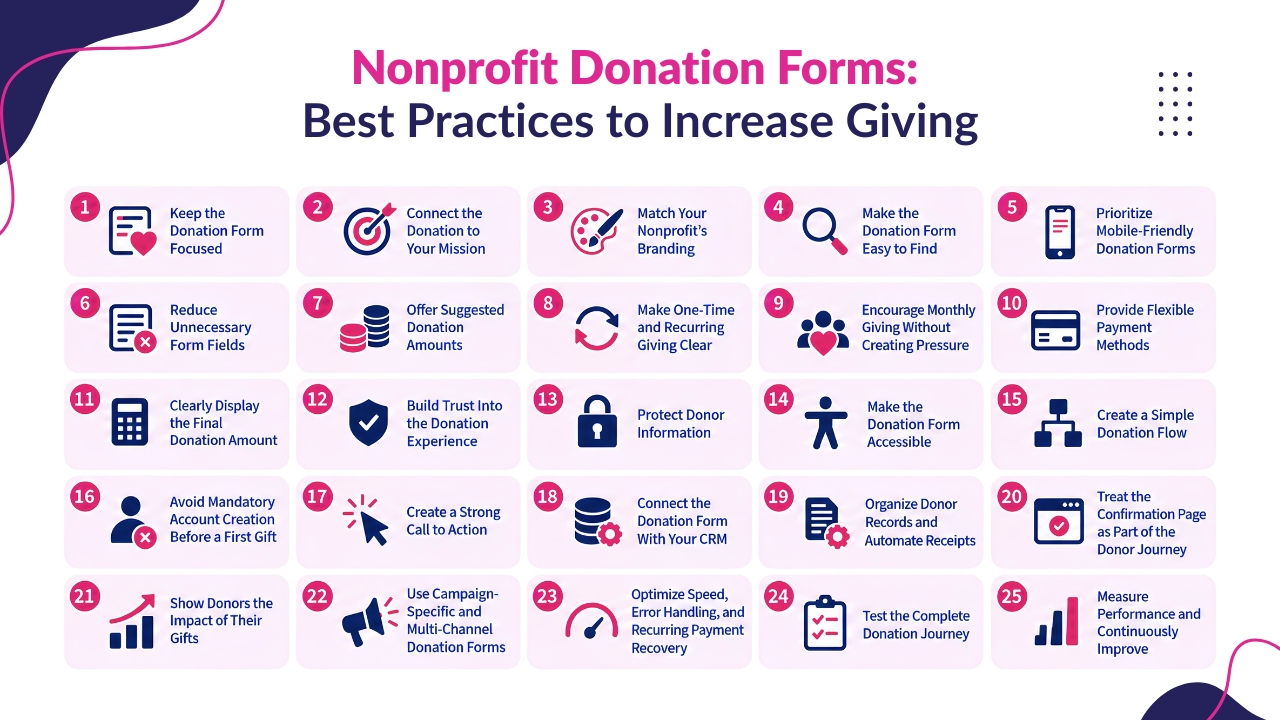
A donation form is one of the most crucial elements of a nonprofit’s online fundraising strategy. It is where a supporter goes beyond from interest to action, that makes the design and functionality of the form critical to fundraising success.
If the online donation form has a confusing layout, unnecessary fields, limited payment options, unclear recurring gift terms, or poor mobile experience can cause potential donors to abandon their donations.
A successful nonprofit donation form should make giving simple, trustworthy, accessible, and convenient. It should explain why the organization needs support, provide appropriate donation options, protect donor information, process payments efficiently, and connect the transaction with donor records and follow-up communications.
Below are the following 25 best practices that can help nonprofits to embed donation form that improve the donor experience, reduce friction, and support stronger long-term fundraising relationships.
The main purpose of a donation form is to help donors to complete their donations. Supporters must be able to avoid filling the page with unnecessary navigation, unwanted promotions, advertisements, long stories, or multiple competing calls to action.
A focused donation page should quickly answer three essential questions:
They must keep the campaign message clear and directly connected to the donation request. If supporters arrive from an email promoting a particular program, the donation page should continue that same page instead of presenting unrelated information.
A focused form reduces chances of supporters to get distracted and allows donors to focus on completing their donation.
Donors may engage when they know how their donations support the purpose of your nonprofit organization. A donation form of a nonprofit should clearly connect the act of giving with the mission, campaign, and community needs of the nonprofit.
Rather than just displaying donation amounts and payment fields, donation forms must include a short message explaining what the campaign aims to achieve and why support of donors is crucial.
For example, a food assistance nonprofit could write: “Help provide meals for families facing food insecurity.” This simple message connects the donation directly to a meaningful need.
Also Read: How to Track Event Attendance for Nonprofit Fundraisers and Community Events
The donation form should look and feel like a natural part of the nonprofit’s website. Consistent branding can reassure supporters that they are giving to the organization they intended to support.
Use recognizable:
A consistent brand experience is especially essential when donors are directed to a separate payment page or platform. This transition should be understandable and trustworthy for supporters rather than appearing to take supporters to an unrelated website.
Providing a consistent visual experience can help donors to feel more comfortable throughout the giving process.
Even having an effective form cannot generate donations if supporters cannot find it. So they must make donation opportunities visible for donors across the online and offline communication channels of the nonprofit organization.
They must consider placing donation links on:
They must use recognizable calls to action like Donate, Give Now, or Support Our Mission. The donation button should be easy to find for supporters without forcing supporters to search through different pages of website navigation.
Also Read: Top Online Fundraising Ideas to Grow Donations Fast
Many supporters may find a nonprofit campaign while using a smartphone. If the donation form is difficult to read, slow to load, or frustrating to complete on a small screen, the organization may lose motivated donors.
A mobile-friendly donation form should include:
Design donation forms for mobile interactions, optimize touchscreen usability, and test them across different screen sizes and devices to ensure a smooth donor experience before important fundraising campaign.
Each extra question adds another decision for donors, while lengthy forms can make the donation process feel like completing an application rather than making a simple contribution.
Ask only for information that is genuinely necessary to:
They must avoid unnecessary surveys, excessive demographic questions, and optional fields that the organization will not actually use. If additional information is useful for donor stewardship, then they must consider making those decisions optional and explain why the information is being requested.
A clear form makes the donation process easier to understand, quicker to complete, and less demanding for donors.
Also Read: How to Set Up Multiple Funds and Split Giving Online
Suggested donation amounts can make the giving decision easier. Rather than asking supporters to determine an amount entirely on their own, provide several appropriate options.
For example:
$25 | $50 | $100 | $250 | Other
Choose suggested amounts based on the nonprofit’s actual giving patterns, campaign goals, and donor audience. Where appropriate, they must connect suggested amounts with accurate impact statements.
For example:
They must always provide an Other Amount option so donors can choose a donation that fits their circumstances.
Donation forms should clearly separate one-time and recurring giving options, helping donors understand their choices and choose the contribution type that best suits their preferences.
For example:
Recurring giving can help nonprofits to build more predictable revenue and develop ongoing relationships with supporters. Platforms like SimplyGiv support recurring schedules including weekly, monthly, quarterly, and annual giving.
Recurring giving options should clearly explain the ongoing commitment, ensuring donors understand the payment frequency, amount, and cancellation processes before confirming.
Clearly identify:
The donor should understand exactly what they are authorizing before completing the transaction.
Also Read: How to Increase Church Donations with Online Giving Tools
Monthly giving can turn a one-time donation into an ongoing relationship, but nonprofits should present recurring options without creating pressure. Clearly explain how continued support benefits the organization and its programs. Clearly explain how continuous support benefits the organization and its programs.
For instance, nonprofits can explain that a monthly donation helps provide consistent support throughout the year and improves financial planning.
Offer simple choices such as:
The primary goal of nonprofits must be to help donors understand the benefits of recurring support and make an informed choice. SimplyGiv’s recurring giving tools can help organizations include recurring options in donation forms while managing schedules, donor history, receipts, and reports.
Different supporters prefer different payment methods, so nonprofits should provide options that suit their audience and payment infrastructure. Common choices include:
Multiple payment options can make donating more convenient and accessible. However, presenting too many choices may make the form appear complicated or overwhelming.
Organizations should prioritize payment methods that their supporters regularly use and trust. The goal is to provide useful flexibility while keeping the donation experience simple, familiar, and easy to complete across devices.
Also Read: 100 Best “Thank You for Donation” Quotes for Donor Appreciation
Donors should know exactly how much they are agreeing to pay before submitting a donation. Clear pricing is especially essential for recurring donations, where both the amount and payment frequency should be visible.
For example:
Transparent payment details help donors understand their commitment and reduce unexpected charges. A clear final amount also builds trust, reduces confusion, and creates a more trustworthy donation experience for supporters.
Donors share financial and personal information while making donations, so donation forms should convey trust clearly. Donation forms must include important details like:
Nonprofits must avoid using decorative security badges that provide no impactful assurance. Supporter trust happens from genuine security, transparent policies, and clear communication, that helps donors to feel confident sharing information and completing contributions without unnecessary problems or confusion.
Also Read: 50+ Raffle Basket Ideas That Actually Raise Money
Donation forms may collect sensitive personal and payment information that makes data protection a crucial responsibility for nonprofits. Organizations should understand:
Access should be restricted as per staff responsibilities and organizational needs. Nonprofits should also review analytics and tracking tools connected to donation forms.
So sensitive information, particularly payment details, should not be unnecessarily transmitted to general analytics platforms. Strong data practices reduce privacy risks, protect supporters, and help nonprofits maintain confidence and trust throughout the donation experience.
Accessibility should be included from the beginning of donation form design. An accessible form supports donors with disabilities while making the experience clearer for everyone.
Important considerations include:
Use clear field labels rather than depending only on placeholders, that help donors understand requirements, navigate the form comfortably, and complete donations with more accessibility and fewer unnecessary barriers.
Also Read: 10 Powerful Thanksgiving Sermons Every Pastor Can Preach
The donation process should follow a clear and predictable sequence so donors always understand what comes next. A practical structure includes:
While organizing smaller campaigns, these elements can work effectively on one page. More complex forms may benefit from clearly separated stages. Each step should serve a specific purpose, while unnecessary screens and questions should be removed.
A clear donation process helps supporters to move through each stage confidently, minimizing confusion, and making it easier to complete their donations.
Requiring first-time donors to create an account before contributing can add unnecessary problems. Allow new supporters to complete their first donation using only essential transaction information.
After the donation, organizations can offer options to:
Account creation can benefit returning supporters, but requiring registration before a first donation may discourage giving. Let new donors donate quickly, then offer account options after completing their donation.
Also Read: Pastor Appreciation Day: Ideas & Gift Guide
The main donation button should clearly explain what happens when donors click it. Having a specific call to action can reduce uncertainty and encourage competition.
Effective options include:
Avoid unclear labels like Submit when a more impactful action can be conveyed. For recurring donations, the button should clearly indicate the ongoing commitment and payment arrangement.
It helps donors to understand what they are authorizing before completing the transaction. A clear call to action also creates a more transparent and confident donation experience.
A completed donation form should go directly into the nonprofit’s donor management or CRM system instead of remaining isolated in a payment platform.
Useful information includes:
Connected data helps fundraising teams to maintain accurate records and deliver relevant follow-up communications. For recurring donors, organizations should track active donations, payment history, failed payments, modifications, cancellations, and other important updates.
This integration can improve donor management while reducing manual data entry and administrative work.
Also Read: Charity Event: Planning Guide
A successful donation system should help maintain clean donor records and provide timely confirmation. Avoid duplicate donor records whenever possible and ensure recurring donations remain associated with the correct donor profile.
An automated receipt should communicate:
For recurring donations, the confirmation should make the ongoing schedule clear.
SimplyGiv describes connected donor records, giving history, recurring support, receipts, and reports as part of its giving capabilities. It also supports automated receipts within its online giving workflows.
The donor experience continues even after payment is successfully processed. The confirmation page should reassure supporters that their donation was received and reinforce the value of their decision.
A useful confirmation message can thank donors and briefly explain how their contribution supports the organization’s mission. Optional next steps may include:
Avoid presenting several additional fundraising requests immediately. The priority should be confirming the donation, expressing appreciation, and helping supporters to feel connected to the impact of their donation.
Impact messaging helps donors to understand how their donations support the nonprofit’s mission and create impactful outcomes. A clear message can explain the value of continued support.
For instance:
For example: Your monthly support helps us provide consistent services throughout the year.
Depending on the organization, impact information may include:
Impact statements of nonprofits should be accurate and specific that help donors to understand how their donations support organizational activities and measurable outcomes without exaggerating the results of individual gifts.
Also Read: 12 Ways to Grow Church Membership
Nonprofits do not need to depend on one generic donation form for every campaign. Campaign-specific forms can support emergency appeals, annual campaigns, Giving Tuesday, year-end fundraising, capital campaigns, events, memorial gifts, and peer-to-peer campaigns.
Customize the messaging for each campaign while keeping the donation experience consistent, and ensure forms remain accessible across various digital and offline channels. Donation forms should also work across multiple channels, including:
SimplyGiv supports campaign pages, embedded forms, recurring giving, peer-to-peer fundraising, and QR-based giving, that helps organizations to reach supporters through different donor touchpoints.
Nonprofits must ensure that their donation forms load quickly and they must clearly explain problems when errors happen. Review image sizes, third-party scripts, tracking tools, embedded content, and mobile performance.
Having a fast, reliable form reduces frustration while effective payment recovery helps nonprofits to maintain recurring donor relationships and revenue.
Testing should cover every phase of the donation journey before campaigns begin. Verify donors can choose gifts, enter information, complete payments, receive confirmations, and see accurate records across devices.
Verify that donors can:
They must also check QR codes, landing pages, links, CRM synchronization, and recurring-payment workflows. A small live transaction can reveal problems with payment processing, integrations, receipts, fraud controls, and accounting workflows that may remain hidden during sandbox testing.
Also Read: 50 Short Thank You Messages for Donations
Consider the donation form as an ongoing fundraising asset, so it is essential for nonprofits to review performance regularly to identify friction, understand donor behavior, and make targeted improvements that strengthen results.
Track key metrics such as:
They must compare one-time and recurring giving by reviewing donor acquisition, revenue, retention, and average recurring donations. Analytics should reveal where donors experience friction like mobile drop-offs or payment failures.
Once performance is stable, A/B test donation amounts, CTA wording, layouts, impact messaging, and recurring options. Focus on targeted improvements rather than collecting unnecessary data.
A well-designed donation form can make giving easier, clearer, and more trustworthy for nonprofit supporters. The strongest forms focus on simplicity while providing enough information to help donors make confident decisions.
Clear donation amounts, visible recurring options, flexible payment methods, accessible design, strong calls to action, and transparent confirmation messages can reduce friction throughout the giving process.
Nonprofits should also protect donor information, connect donation data with their CRM, and ensure recurring payments are properly monitored and recovered when failures happen. Testing the complete donation journey across devices and payment scenarios helps to identify problems before they affect campaigns.
Most importantly, donation forms should continue to evolve based on real donor behavior and performance data. By tracking completion rates, cart abandonment, recurring giving, payment failures, and other useful metrics, organizations can identify friction and make targeted improvements.
A simple, secure, accessible, and donor-focused form can support stronger fundraising results and lasting relationships with supporters.
If you still have any query about best practices for donation forms then you may Book a Demo at SimplyGiv and we are more than happy to assist you.